
A SMJY Tech Product
Appshot Studio
Screenshot. Style. Ship.
A macOS app and MCP service that turns your device screenshots and marketing copy into pixel-perfect App Store images — gradient backgrounds, bold headlines, iPhone and iPad frames, exported at exact store sizes.
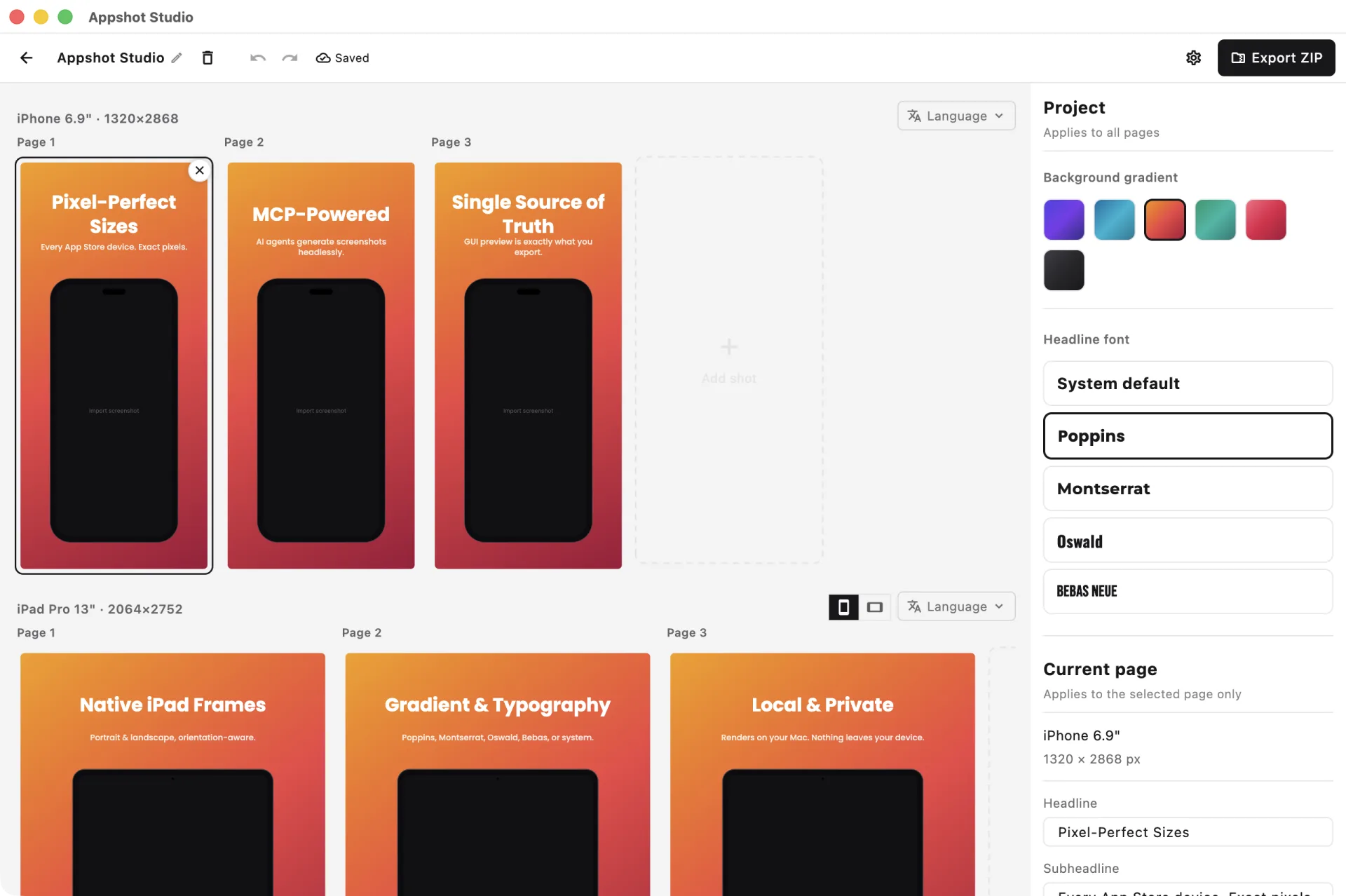
Core Features
Everything you need to ship App Store screenshots that sell
Pixel-Perfect Export
Export at exact App Store sizes — iPhone 6.9", 6.7", 6.5" and iPad 13", 12.9". No manual resizing, no guessing, no rejected assets.
MCP / AI Agent
A built-in Model Context Protocol server lets AI agents generate screenshots headlessly — same renderer, same output, fully scriptable for batch generation.
Single Source of Truth
The GUI preview and headless export share one painter. What you see in the editor is exactly what gets exported — pixel for pixel, every time.
Gradient & Typography
Gradient backgrounds with bold top headlines and subheadlines. Choose Poppins, Montserrat, Oswald, Bebas, or system fonts to match your brand.
Device Frames
Realistic iPhone shells with Dynamic Island and full iPad frames, with automatic orientation-mismatch detection and a prompt to switch.
Local & Private
Everything renders locally on your Mac. Your screenshots and copy never leave your device — no cloud uploads, no telemetry on your assets.
Connect Appshot Studio to Your AI Agent
/Applications/Appshot Studio.app/Contents/MacOS/appshot_studio{
"mcpServers": {
"appshot-studio": {
"command": "/Applications/Appshot Studio.app/Contents/MacOS/appshot_studio",
"args": ["--mcp"]
}
}
}claude mcp add appshot-studio -- "/Applications/Appshot Studio.app/Contents/MacOS/appshot_studio" --mcpWhere each client reads it
- Claude Code — .mcp.json in your project root, or the one-liner above.
- Cursor — .cursor/mcp.json, or Settings → MCP.
- Claude Desktop — ~/Library/Application Support/Claude/claude_desktop_config.json
Requirements & gotchas
- command must be the absolute path to the executable inside the bundle — not the .app folder.
- the --mcp flag is required; omitting it launches the GUI.
- screenshots are sent as base64 data: URIs (file paths are rejected by the sandbox); exported PNGs come back as local absolute paths.
- requires macOS 15 or later.
Private by Design, Local by Default
Appshot Studio renders everything locally on your Mac. Your app screenshots and marketing copy are composited on-device and never uploaded to any server.
Local Rendering
Every screenshot is composited and painted on your Mac
On-Device Only
The MCP server runs as a local process — no external calls
You Keep Your Assets
Your screenshots and copy never leave your device
Frequently Asked Questions
Answers to the questions we hear most about Appshot Studio
What is Appshot Studio?+
Appshot Studio is a macOS app that turns your device screenshots and marketing copy into App Store-ready images — gradient backgrounds, bold headlines, and iPhone/iPad frames — exported at exact pixel sizes. It also ships a MCP service so AI agents can generate screenshots headlessly.
What is the MCP service?+
MCP (Model Context Protocol) lets AI assistants like Claude call Appshot Studio directly. Your agent can create projects, compose shots, and export PNGs through the same renderer the GUI uses — ideal for batch generation and automation. It runs as a local process on your Mac.
Which sizes are supported?+
All required App Store sizes: iPhone 6.9" (1320×2868), 6.7" (1290×2796), 6.5" (1242×2688), iPad 13" (2064×2752), and 12.9" (2048×2732).
How much does it cost?+
Appshot Studio is available on the Mac App Store as a one-time purchase of $9.99 (USD) — no subscription.
Why macOS only?+
Appshot Studio is a native macOS app, optimized for Apple Silicon and Intel Macs. We're focused on the Apple developer workflow first; other platforms may come later.
Are the GUI preview and the export identical?+
Yes. Both paths share a single painter as the source of truth — what you preview in the editor is exactly what you export, pixel for pixel. The MCP service uses that same painter too.
Contact & Feedback
Have questions, suggestions, or partnership ideas about Appshot Studio? Email us — we read every message.
tzhh0617@gmail.comWe typically reply within 1–3 business days.